font-display, preload and the crossorigin you forgot

Fonts are the one resource where a small mistake in a <link> tag causes a double download. It is easy to miss, because the page still looks fine.
The crossorigin attribute
Browsers fetch fonts in CORS mode, even from the same origin. A preload without crossorigin is fetched in a different mode, so the request does not match the one the CSS makes later, and the browser downloads the font again. The DevTools network panel shows the file twice.
<link rel="preload" href="/fonts/Inter-var.woff2"
      as="font" type="font/woff2" crossorigin>
Preload only what the first screen needs, usually one or two files. Every extra preload competes with the stylesheet and the LCP image.
What users see while the font loads
font-display sets how the text behaves during the wait.
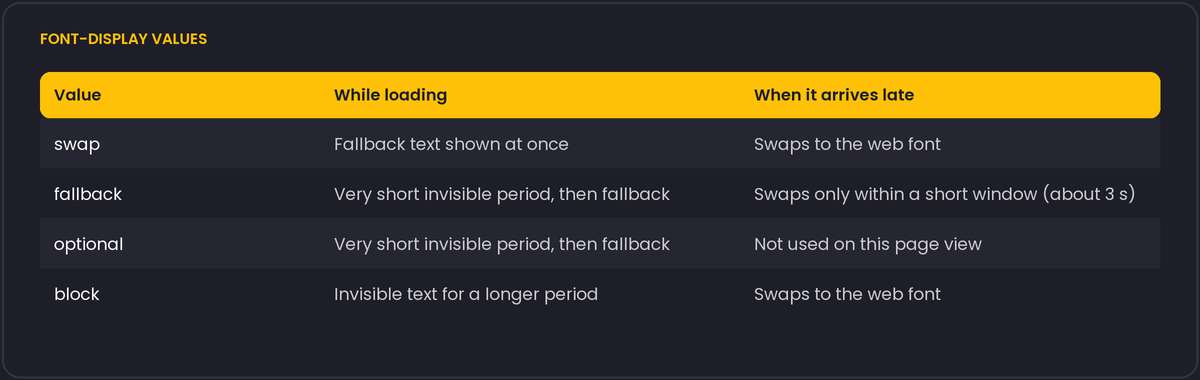
swap is the common choice for body text. It guarantees readable text at once, at the cost of a visible font change and a possible layout shift. optional suits fonts that are decoration more than identity: if the font is not ready almost immediately, the fallback stays for that page view, and the font is used from the cache on the next one.
Making the swap less visible
The layout shift on swap comes from different letter widths and line heights between the fallback and the web font. The @font-face descriptors size-adjust, ascent-override, descent-override and line-gap-override let you define a fallback face that matches the web font's proportions, so text barely moves when the swap happens.
Other details worth checking
- Serve WOFF2 only. Every browser that matters supports it, and the older formats are dead weight.
- Subset with
unicode-rangeif you ship several scripts, so a Latin visitor never downloads Cyrillic glyphs. - A variable font can replace four static weights with one file. Compare the sizes before assuming it is smaller, since a variable font with many axes can be larger than the two weights you actually use.
- Self-hosting avoids a connection to a third-party origin on the critical path.
Knowing when the font actually arrived
The CSS Font Loading API exposes document.fonts.ready, a promise that resolves once the fonts needed for the current layout have loaded (or failed and fallen back). It is the reliable way to trigger something after a font swap, instead of guessing with a timeout:
document.fonts.ready.then(() => {
  document.documentElement.classList.add('fonts-loaded');
});
A common pattern pairs this with font-display: optional or a class-based approach: the page renders with the fallback font from the start, and a stylesheet rule scoped to .fonts-loaded switches to the web font only once it is confirmed ready, which avoids a flash where the browser tries and briefly fails before the real content shows. document.fonts.check('1em "Inter"') answers a narrower question, whether one specific font is already loaded, without waiting.
If the font comes from a third-party host such as Google Fonts, add <link rel="preconnect" href="https://fonts.gstatic.com" crossorigin> ahead of the stylesheet link. It resolves DNS, opens the TCP connection and completes the TLS handshake early, so the actual font request that follows only has to wait for the download itself.