
CORS preflights: what triggers them and what you can cache

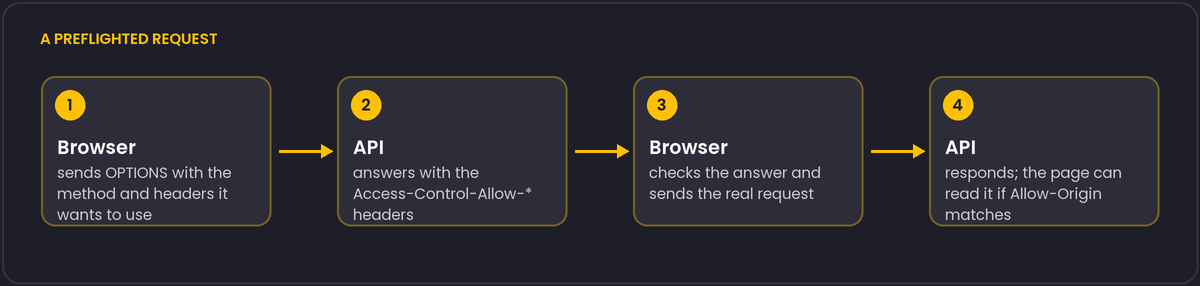
A single-page app calls an API on another origin, and the access log fills with OPTIONS requests, one before nearly every real call. That is not a misconfiguration. It is what the browser does when a request is not "simple".
What counts as simple
A cross-origin request skips the preflight only when everything about it is on the browser's safe list: the method is GET, HEAD or POST, the headers are limited to a small set of safelisted ones, and if there is a body, its Content-Type is application/x-www-form-urlencoded, multipart/form-data or text/plain.
This has practical consequences:
Content-Type: application/jsontriggers a preflight, which is why almost every JSON API meets one.- An
Authorizationheader triggers it. So do most custom headers, such asX-Requested-Withor a tracing header. PUT,PATCHandDELETEtrigger it.
Caching the answer
The server can add Access-Control-Max-Age: <seconds> to the preflight response, and the browser will reuse the result for that long without asking again. Browsers cap the value. As far as we know, Chromium caps it at two hours and Firefox at a day, though those limits have changed before, so treat the exact numbers as something to verify. Even with a cap, sending the header removes most preflights for an active user.
Mistakes that look like CORS bugs
Access-Control-Allow-Origin: *cannot be combined with credentials. If the request sends cookies, the server has to name the origin.- If the allowed origin is chosen dynamically from the request, add
Vary: Origin, or a cache may hand the wrongAllow-Originvalue to another site. - A preflight is not authenticated. If your framework rejects
OPTIONSrequests because there is no token, the browser sees a failed preflight and reports a CORS error, although the real cause is authorization.
The most reliable simplification is to avoid the second origin: serving the API under the same origin through a reverse proxy removes preflights entirely.
Private Network Access adds another preflight
A newer rule affects requests from a public web page to a server on a private network, such as localhost or an address in a private IP range. When the page's origin is considered "public" and the target is "private" or "local", Chromium-based browsers add a Access-Control-Request-Private-Network: true header to the preflight, and the server has to answer with Access-Control-Allow-Private-Network: true for the real request to proceed. This mostly affects developer tools and local devices (printers, routers, local development servers) that a public site tries to reach, and it is easy to miss because the ordinary CORS headers all look correct.
A second detail worth knowing about caching: Access-Control-Max-Age only caches the answer for the exact combination of method and headers that were preflighted. A later request from the same page with one extra custom header triggers a fresh preflight, even within the cached window, because the browser is caching the answer to a specific question, not a blanket permission for the origin pair.