
Service worker updates: why users keep the old version

You deploy a fix, open the site, and still see the old bug. A hard refresh helps, though real users will not do one. This is the service worker lifecycle doing exactly what it was designed to do.
Installed, but waiting
When the browser finds a changed sw.js, the new worker installs, and then it waits. It only activates when no page controlled by the old worker remains open. Reloading a tab does not count as closing it, because the old worker keeps controlling the new page load. That is deliberate: a page and its worker should not change versions halfway through a session.
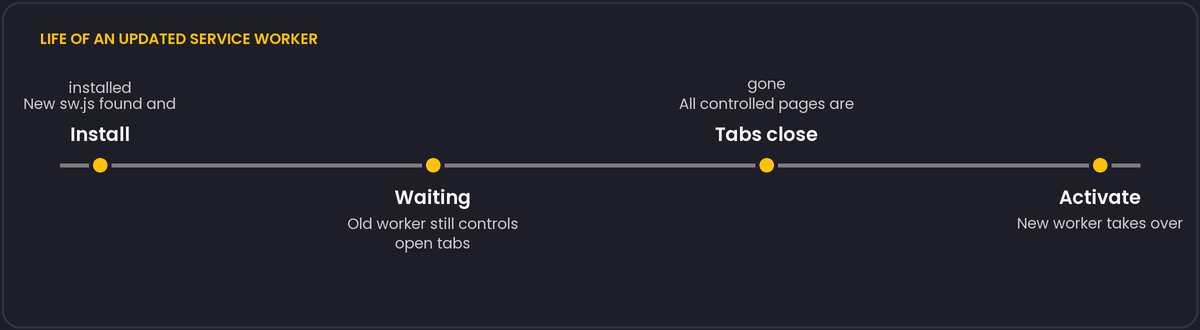
The shortcut and its price
Calling self.skipWaiting() in install and clients.claim() in activate makes the new worker take over at once. It is tempting, and it creates a mismatch: a page that loaded old JavaScript may now be served by a worker that expects new asset names, and a precached file the old page needs may have been deleted. If you use both, make asset caches versioned and delete old ones only after activation.
const CACHE = 'static-v42';

self.addEventListener('activate', (event) => {
  event.waitUntil(
    caches.keys().then((names) =>
      Promise.all(names.filter((n) => n !== CACHE).map((n) => caches.delete(n)))
    )
  );
});
Things that make updates slow
- Serving
sw.jswith a longCache-Control. Browsers check for a new worker script on navigation and at least every day or so, and current browsers bypass the HTTP cache for the worker script by default, but a CDN in front may not. Give itno-cache. - Caching HTML with a cache-first strategy. The page then references asset URLs from an old build. Use network-first for navigations, or stale-while-revalidate with a way to tell the user to reload.
- Never testing the update path. Most bugs only show up on the second deployment, so test upgrade, not just first install.
If you can, add a visible "a new version is available" prompt. It turns an invisible race into something users can act on.
updateViaCache and how often browsers check
navigator.serviceWorker.register() takes an updateViaCache option that controls whether the browser is allowed to serve the worker script itself, and the scripts it imports, from the HTTP cache on the periodic update check. The default, 'imports', still lets the main worker script be checked fresh but allows imported scripts to come from cache; 'none' disables caching for both, which is the safer choice while you are still getting the update flow right.
navigator.serviceWorker.register('/sw.js', { updateViaCache: 'none' });Browsers also check for a new worker on their own schedule, independent of deployments: on every navigation to a page in the worker's scope, and at least roughly once a day if the site is used continuously without a full navigation. That daily-ish check is a browser implementation detail, not a spec guarantee, so do not depend on a specific number. If you need updates to land sooner than that, the visible "reload to update" prompt mentioned above is the reliable path, not a shorter timer.