
Cache-Control: no-cache does not mean what you think

Someone adds Cache-Control: no-cache to a page that shows account data, the ticket gets closed, and everybody moves on. It should not be closed. Despite the name, no-cache does not stop anything from being stored.
What each directive actually says
no-cache means a cache may keep the response but has to ask the origin before it reuses it. The usual form of that question is a conditional request with If-None-Match or If-Modified-Since, answered with a small 304 Not Modified when nothing changed. no-store is the one that says: do not write this response to any cache at all.
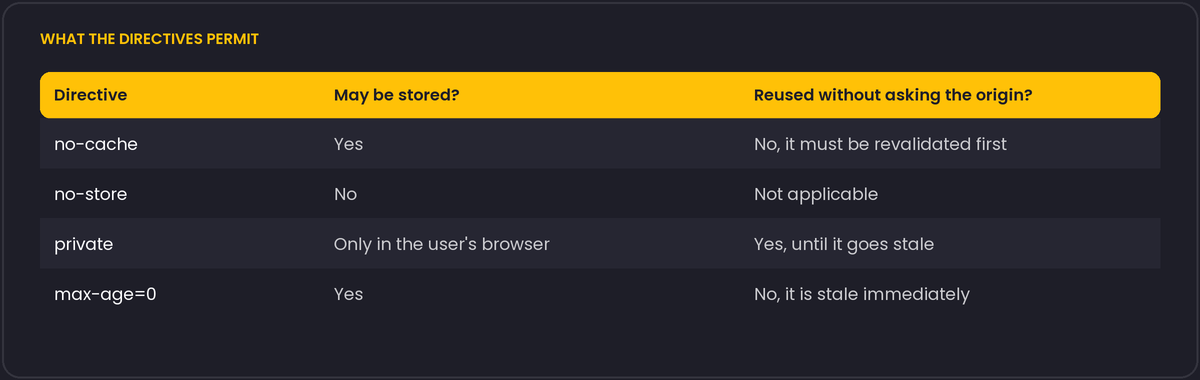
max-age=0 behaves much like no-cache in practice, but no-cache states the intent better. private restricts storage to the user's own browser, so a CDN or a corporate proxy must not keep the response.
What to send for which response
- Fingerprinted static files such as
app.4f9c2e.js:public, max-age=31536000, immutable. The URL changes when the content does, so caching for a year is safe. - HTML that changes over time:
no-cachetogether with anETag, so the browser revalidates cheaply. - Personalised pages and API responses with private data:
private, andno-storeif the data should not linger on disk. - Anything shown after a login on a machine other people may use:
no-store.
Two traps
A no-store on the main document has historically kept the page out of the browser's back/forward cache, which makes the back button slower. Browsers have been changing this behaviour, so test the current versions instead of trusting old advice.
The header also only matters if it survives the trip. If the framework sets Cache-Control on some paths and a reverse proxy overwrites it on others, the policy that applies is whatever leaves the last hop. Check it with curl -sI against the public URL, not against the application server.
must-revalidate and the stale-while-revalidate family
no-cache forces revalidation on every use. must-revalidate is weaker: it only forces revalidation once the response has gone stale according to max-age, and until then a cache may serve it without asking. The two are often confused because both contain the word "revalidate".
Two newer directives change what happens while that revalidation is in flight. stale-while-revalidate=<seconds> lets a cache serve the stale copy immediately while it fetches a fresh one in the background, so the visitor never waits on the revalidation request. stale-if-error=<seconds> lets a cache keep serving the stale copy if the origin returns an error or times out, which is a cheap way to survive a short origin outage. Both are documented in RFC 5861 and supported by most CDNs; browser support for the client-side cache is more recent, so check before relying on it there.
Cache-Control: max-age=60, stale-while-revalidate=300, stale-if-error=3600For a page that changes a few times an hour but does not need to be perfectly fresh, this combination often beats no-cache outright: visitors get an instant response from cache, and the origin only has to answer one revalidation request per stale-while-revalidate window instead of one per visitor.