
Hardening a small VPS: the ten minutes that matter most

A new public server starts receiving login attempts almost at once. Nobody is targeting you personally; automated scanners try every address. A handful of basic settings closes the doors that automated attacks use.
SSH first
Create a non-root user with sudo, copy your public key to it, and confirm you can log in with the key before changing anything else. Then, in /etc/ssh/sshd_config (or a file under sshd_config.d/):
PasswordAuthentication no
PermitRootLogin no
PubkeyAuthentication yes
Check the syntax with sshd -t, reload the service, and open a second session to verify access before closing the first. Passwords are the part scanners attack, and a key-only server removes that whole category. Changing the port reduces log noise, but it is not a security control, so do not rely on it.
Updates
Apply security updates automatically. On Debian and Ubuntu, unattended-upgrades does that for the security pocket, and you can set whether it reboots when a kernel update needs one. Decide deliberately: unattended reboots keep the kernel current but need a service that tolerates a restart. Also update the applications you installed by other means (containers, language packages), because the system package manager does not cover them.
Know what is listening
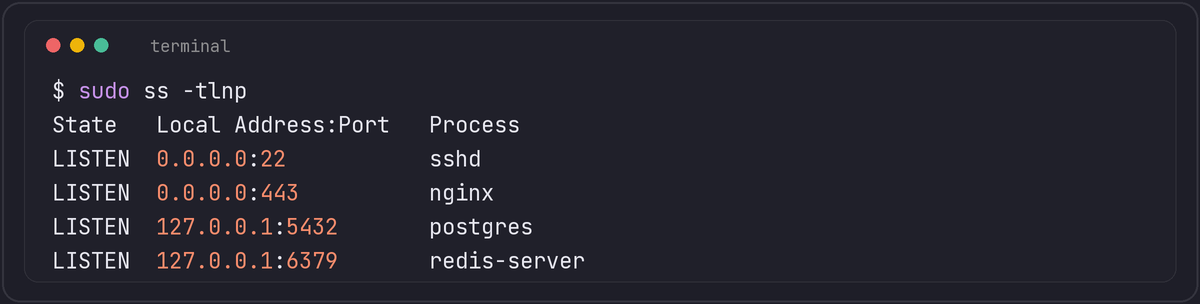
ss -tlnp lists listening TCP sockets with the owning process. Anything bound to 0.0.0.0 or [::] is reachable from outside, if the firewall lets it through. Databases and caches such as PostgreSQL and Redis should listen on 127.0.0.1 or a private interface only. A firewall (ufw, nftables, or your provider's security group) should allow just SSH and the ports the service needs. Remember the firewall rules for IPv6 as well, since it is easy to secure IPv4 and forget the other stack.
Reduce what an intruder can do
- Give services their own unprivileged users, and do not run web applications as root.
- Keep secrets in files readable only by the service user (
chmod 600), not in world-readable configuration. - Turn on the provider's snapshots or backups, and test one restore.
Where fail2ban and similar tools fit
Tools like fail2ban and CrowdSec read logs and block IPs after repeated failures. With key-only SSH they mainly reduce log noise and load. They are more valuable in front of web login forms and APIs. They are not a substitute for the settings above.
Watch the basics
Send the logs somewhere other than the server itself, check last and journalctl -u ssh occasionally for logins you do not recognise, and set up an alert for disk and memory. Most compromises of small servers are discovered by an unusual load average or a full disk.
Key type and a couple of sshd_config lines that add up
ssh-keygen -t ed25519 generates a modern elliptic-curve key that is smaller and faster to verify than an equivalent-strength RSA key, and is the type most current guidance recommends for new keys; keep RSA around only for the rare system that has not caught up. A few more sshd_config lines worth adding alongside the ones already covered:
AllowUsers deploy admin
MaxAuthTries 3
ClientAliveInterval 300
ClientAliveCountMax 2
AllowUsers (or AllowGroups) is a second layer behind key-only auth: even a key that somehow authenticates for an account not on the list is refused. MaxAuthTries limits how many authentication attempts a single connection gets before it is dropped. The ClientAlive pair makes the server close connections that have gone quiet without a clean disconnect, which matters on a small server where a handful of stuck sessions can be a meaningful fraction of its resources.
For anything more sensitive than a small personal VPS, time-based one-time passwords through PAM (libpam-google-authenticator or similar) add a second factor on top of the key, at the cost of one more thing that can lock you out if misconfigured, so test the second factor from a second, already-open session before closing the first, the same discipline used above for the PasswordAuthentication change itself.