Password hashing parameters you can defend in an audit
"We use bcrypt" answers a checklist question. It does not say whether the cost factor is reasonable, whether old hashes are ever upgraded, or whether long passwords are silently cut.
Order of preference
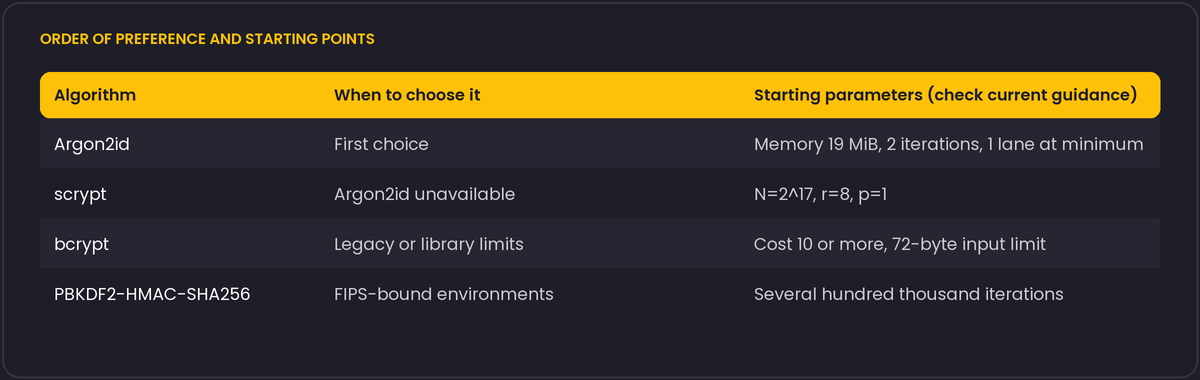
OWASP's Password Storage Cheat Sheet, as of the version we read, recommends Argon2id first. Its minimum suggested configuration is 19 MiB of memory, 2 iterations and 1 degree of parallelism, with other combinations of the same strength listed. If Argon2id is not available, scrypt with a work factor around N=2^17, r=8, p=1 comes next, then bcrypt with a work factor of at least 10, and PBKDF2 with HMAC-SHA-256 and a high iteration count (several hundred thousand) where FIPS compliance is required. The numbers get revised as hardware improves, so check the current sheet and record which version you followed.
Tune to your hardware, not to a blog post
A parameter set is only meaningful relative to what an attacker's hardware can do and what your login endpoint can afford. A reasonable method: pick the memory and iteration values, time one hash on your production hardware, and aim for a delay you can live with under peak login load (tens to a few hundred milliseconds is common). Then test what happens when a few hundred logins arrive at once. A slow hash with no rate limiting becomes a denial-of-service lever.
The bcrypt limit
bcrypt only uses the first 72 bytes of the input. A long passphrase and the same passphrase with different characters after byte 72 hash identically. Some libraries raise an error, some truncate silently. Multibyte characters count in bytes, so a password of 30 emoji is far beyond 72 bytes. Frameworks that pre-hash the password with SHA-256 before bcrypt avoid the limit, but pre-hashing has its own trap: if the digest is used as raw bytes, a NUL byte ends the string in some implementations, so encode it (base64) first.
Upgrading over time
Store the algorithm and parameters inside the hash string, which the standard formats already do. On each successful login, check whether the stored hash uses the current policy and, if not, rehash the password you just verified and save it. Django does this for you with PASSWORD_HASHERS: the first entry is used for new hashes, and users on older ones are upgraded as they log in. PHP offers password_needs_rehash.
Things that are not in the hash function
- Per-user random salts are generated by these functions automatically. Do not add your own scheme on top.
- A pepper, meaning a secret kept outside the database and mixed in, helps if only the database leaks. Keep it in a secrets manager, and plan for rotation before you need it.
- Rate limit and monitor logins. Even the best hash does not protect an account with a guessable password from an online attack.
Do not add rules the hash function does not need
NIST's Special Publication 800-63B, the US government's digital identity guidelines, recommends the opposite of what many login forms still enforce: it advises against mandatory periodic password changes and against composition rules that force a mix of character classes, and it recommends accepting long passwords, at minimum 64 characters, rather than capping length artificially. The reasoning is that forced rotation and composition rules push people toward predictable patterns and reused passwords across sites, which does more harm to actual security than the rules prevent. A cap far below 64 characters, or a rule rejecting spaces and punctuation, more often reflects an old assumption about the hash function (bcrypt's 72-byte limit, mentioned above, is a common source of an accidental low cap) than a deliberate security decision.
If your bcrypt-based system currently caps passwords near 72 characters because of that limit, and you cannot move to Argon2id soon, document the cap deliberately rather than leaving it as an unexplained side effect, and make sure truncation is not happening silently below whatever limit you do enforce.