You committed a secret. Rotate first, rewrite later
The key is in a commit, the commit is pushed, and the first instinct is to delete the line and push again. It feels like a fix and it is not one.
Assume it has been copied
Git keeps history. The old commit is still reachable from the previous refs, from every clone and fork, from pull request references on the hosting service, and possibly from CI caches. Automated scanners watch public repositories continuously, and keys on public hosting have been used within minutes of being pushed. For a private repository the risk is lower and the answer is the same: treat the secret as compromised.
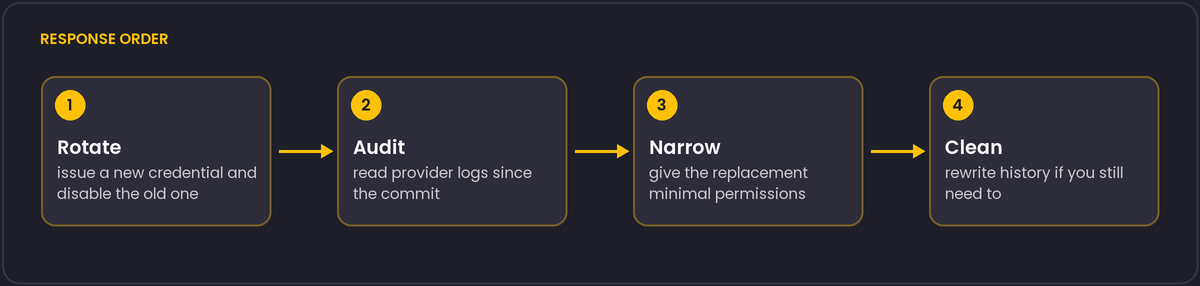
The response, in order
- Rotate or revoke the credential first. Issue a new key, deploy it, disable the old one. Everything else is secondary to this step.
- Check whether it was used. Look at the provider's audit logs for the period since the commit: unfamiliar IPs, new resources, unusual API calls. For cloud keys, also look for new IAM users and new access keys.
- Limit the blast radius going forward. Was the key broader than the task needed? Replace it with one that has minimal permissions.
- Then, if you want, clean history. Tools such as
git filter-repoor BFG Repo-Cleaner remove a file or a string from all commits. It matters for hygiene and for keeping the secret out of future clones, but it requires a force push and every collaborator must re-clone. It does not un-leak anything that was already fetched.
Prevention that actually gets used
- Push protection and secret scanning on the hosting service block or flag known token formats before or right after a push. Turn them on for every repository.
- A pre-commit hook with a scanner such as gitleaks or trufflehog catches mistakes on the developer's machine before they reach the remote. Hooks can be bypassed, so treat them as a convenience and keep server-side scanning as the backstop.
- Keep secrets out of the repository by design. Read them from environment variables or a secrets manager, list the local file (
.env) in.gitignorefrom the first commit, and provide an.env.examplewith empty values. - Short-lived credentials. Tokens that expire in an hour make a leak a much smaller event.
What not to put in the commit message either
People remove the key from the code and then paste it into the commit message or the pull request description while explaining what happened. Scan those as well.
Finding every place the secret went, not just the commit
The commit that introduced the secret is the easy part to find. The harder question is where it propagated to before you rotated it: forks of the repository keep their own copy of the history and are not affected by your force push at all, pull request diffs are sometimes retained by the hosting service even after the source branch is deleted, and CI logs frequently echo environment variables or command lines that included the secret in plain text, sitting in a build log with its own separate retention policy. Search build logs for the credential's distinctive prefix, not just the repository, and check whether any CI artefact (a built container image, a bundled config file) baked the value in.
Hosting services also keep commits reachable for some time after a force push removes them from a branch, through mechanisms like reflog-style references or the platform's own commit API, specifically so that a mistaken force push is recoverable. That same feature works against you here: do not assume a rewritten history is instantly and completely gone from the hosting service's storage, which is one more reason rotation, not rewriting, is the step that actually closes the exposure.