Dependency pinning with hashes, and dependency confusion
requirements.txt with pinned versions is a good habit. It leaves two gaps that supply-chain attacks use.
What a version pin does not stop
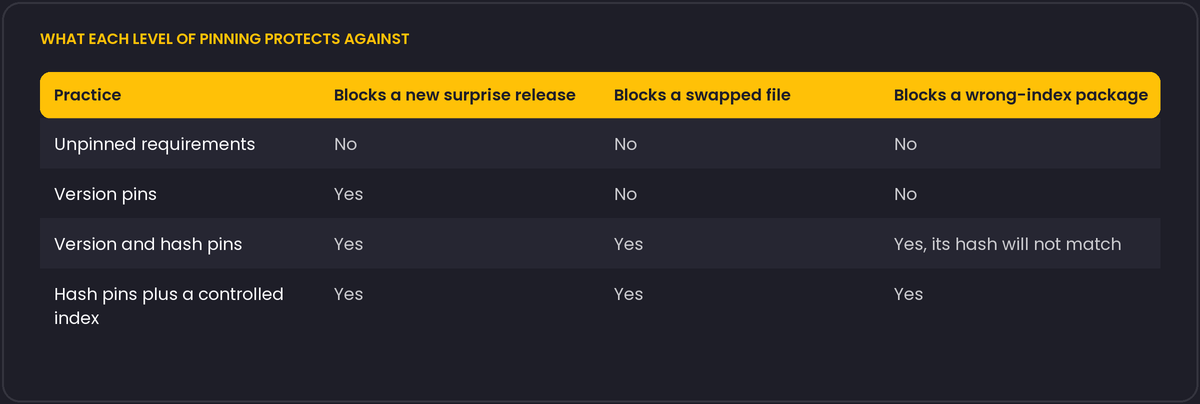
A pin says "install version 2.31.0 of this package". It does not say which file. If the package index or your mirror serves a different file for that version (a compromised account, a cache poisoning, a re-upload), pip installs it. A hash pin says which file:
requests==2.31.0 \
    --hash=sha256:...
With pip install --require-hashes -r requirements.txt, pip refuses any file whose hash is not listed, and it also refuses to install anything unpinned, including transitive dependencies. Generating that file by hand is impractical, so use a tool that resolves and hashes: pip-compile --generate-hashes (pip-tools), uv pip compile --generate-hashes, Poetry or PDM lockfiles. Commit the lockfile, and install from it in CI and in production.
Dependency confusion
Suppose your company has a private package called acme-utils on an internal index. If a build resolves packages from both the internal index and the public one, and someone publishes acme-utils with a higher version number on the public index, the resolver may choose it. The attack was demonstrated in 2021 and worked against many large companies.
Defences:
- Reserve your private package names on the public index, or use a naming scheme with a prefix you own.
- Configure the tool so that internal names only resolve from the internal index. With pip,
--extra-index-urlsearches both and takes the best version, which is the risky behaviour, while--index-urlpointing to a proxy that you control (which fetches public packages through it and blocks your reserved names) is safer. - Use a proxy or mirror with allowlists, and log what is pulled in.
Typosquatting and look-alikes
Packages with names one character away from popular ones appear regularly. Copying an install command from a random forum answer is how they spread. Check the name, the maintainer, the release history and the number of downloads before adding an unfamiliar dependency, and avoid installing on a whim from a chat message.
Install-time code
A source distribution can run arbitrary code at install time through setup.py or its build backend. Wheels skip that step, although importing the package still runs its code. In npm, lifecycle scripts run by default, and npm ci --ignore-scripts turns them off. Build in an environment without production secrets, so a malicious install script finds nothing to steal.
Practical routine
- Lock with hashes, install with
--require-hashesin CI. - Run an audit (
pip-audit,npm audit, GitHub Dependabot alerts) on a schedule. - Review dependency changes in pull requests like code changes.
- Publish your own packages with trusted publishing (short-lived tokens issued by the CI provider) instead of long-lived API tokens, where the registry supports it.
npm gets some of this by default
It is worth contrasting Python's opt-in hash pinning with npm's default behaviour, since developers moving between the two ecosystems often assume Python works the same way. package-lock.json records an integrity hash (a base64-encoded subresource-integrity-style digest) for every resolved package automatically, as part of the ordinary npm install workflow, and npm ci verifies against that lockfile and fails the install on a mismatch, no extra flag needed. Python's equivalent protection exists (--require-hashes, and the lockfile tools mentioned above), but it is opt-in and easy to skip, which is part of why hash pinning is the step most Python projects are missing, as the table below already summarises.
For publishing your own packages, PyPI's trusted publishing mechanism is worth setting up even for a small internal or personal project: it uses short-lived OpenID Connect tokens issued by your CI provider (GitHub Actions and a few others are supported) for each individual publish, so there is no long-lived API token sitting in a CI secret store waiting to be exfiltrated by an unrelated compromise of that pipeline.