Parsing sensor frames from a serial port with struct
The device sends a temperature and a humidity value ten times a second as a small binary frame. Reading them with ser.read(8) works on the desk and fails in the field, because a serial port delivers a stream of bytes, and your read call knows nothing about frame boundaries.
Treat it as a stream
Three things go wrong in practice: a read returns half a frame, the first bytes after opening the port are the tail of an earlier frame, and a byte is occasionally corrupted. The parser keeps a buffer, looks for the header, checks the length and the checksum, and consumes a frame only when all of it is valid.
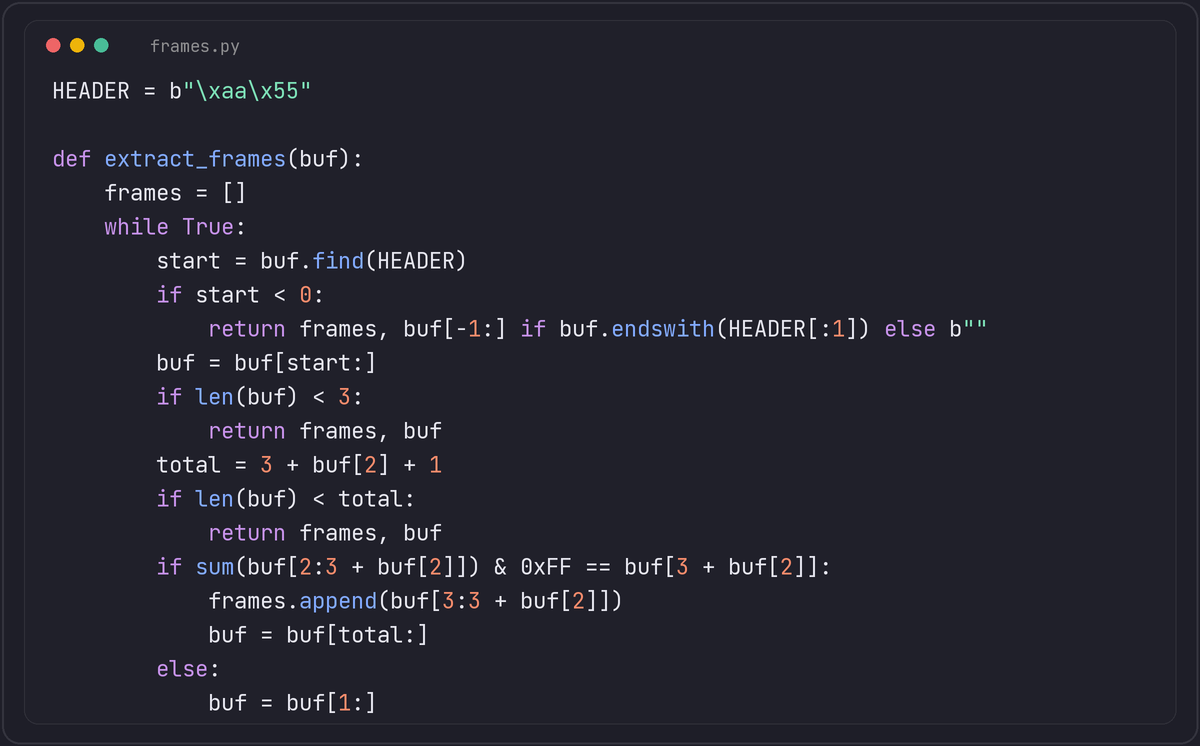
The example frame is AA 55 | length | payload | checksum, and the checksum is the sum of the length and payload bytes modulo 256. We ran the function against a stream that starts with garbage, arrives in two pieces and has one corrupted frame: it returned exactly the valid frames and skipped the bad one by moving forward a single byte and looking for the next header.
Decoding the payload
temperature_c, humidity = struct.unpack('<hH', payload)
temperature_c /= 100
humidity /= 100
Always give struct an explicit byte-order character. The default @ uses your machine's native byte order and native alignment, which pads fields. The format HhI takes 8 bytes in native mode here, and the format BI takes 8 bytes native but 5 bytes with <, which is what a device that packs its data tightly actually sends. < means little-endian with standard sizes and no padding; > is big-endian.
Reading from the port
buffer = b''
while True:
    buffer += ser.read(ser.in_waiting or 1)
    frames, buffer = extract_frames(buffer)
    for payload in frames:
        handle(payload)
Open the port with a timeout so the loop can also shut down and notice a silent device. Bound the buffer: if you have gone a long time without finding a header, discard old data, or a noisy line will fill memory.
Hardware details worth checking first
- Baud rate, parity and stop bits must match the device exactly. A wrong setting often looks like random garbage that happens to include the occasional valid frame.
- Cheap USB-to-serial adapters and long cables pick up noise. If checksums fail in bursts, check grounding and cable length before blaming the code.
- 3.3 V and 5 V logic levels are not interchangeable. Connecting a 5 V TX line to a 3.3 V RX pin can damage the receiving chip.
Testing without the hardware attached
Waiting for a physical device on every test run slows a team down, and CI machines usually do not have one plugged in at all. On Linux and macOS, socat can create a pair of connected virtual serial ports (socat -d -d pty,raw,echo=0 pty,raw,echo=0), one of which your test harness opens as if it were the real device while a small script on the other end plays back captured frames, including deliberately corrupted ones. Record a real session from the actual hardware once, replay it in every test run after that, and add synthetic corruption on top for the resynchronisation path.
pyserial also ships serial.tools.list_ports, which enumerates connected devices with their vendor and product IDs. Matching on those IDs instead of a fixed device path such as /dev/ttyUSB0 makes a deployment script more robust, since the path a given adapter gets assigned can change between boots or when more than one is plugged in.