Free-threaded Python: what is real and what is hype
Talks and headlines suggest the GIL is gone. On the interpreter most of us actually install, it is not, and it helps to know exactly what changed.
Check what you are running
import sys
print(sys._is_gil_enabled())
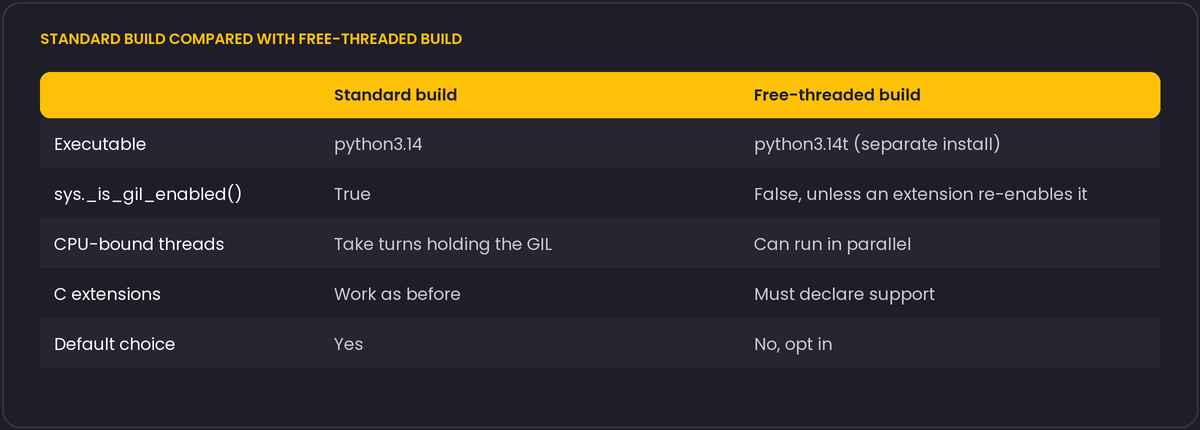
On the standard Python 3.14.4 build we tested, this prints True. The function exists since Python 3.13. Trying to switch the GIL off on that build does not quietly do something else: python -X gil=0 (or the environment variable PYTHON_GIL=0) fails at startup with Disabling the GIL is not supported by this build.
Two builds, not one setting
Free-threaded Python, described in PEP 703, is a separate build of the interpreter, distributed as its own executable (typically with a t suffix, such as python3.14t). It was experimental in 3.13. Later releases moved toward wider support under PEP 779, but it is still opt-in, and the standard build is still the default, so check the current release notes for the state of your version.
What it means for your code
- Threads can run Python code in parallel. CPU-bound work split across threads can scale across cores, which was not possible before without processes.
- Single-threaded programs may run somewhat slower on the free-threaded build, because the interpreter needs extra synchronisation. The size of the cost has changed between releases, so measure your own workload.
- C extensions have to declare support. If an extension does not, importing it re-enables the GIL for the process (with a warning). Many popular packages have added support, but check the ones you depend on, and check that wheels exist for the free-threaded build.
- Your own race conditions become visible. Code that was accidentally safe under the GIL, such as unsynchronised updates of shared dictionaries and counters, may now break. Built-in containers are protected internally, but compound operations such as read-modify-write are not atomic. Use locks, queues or thread-safe designs.
Should you use it?
Do not switch production workloads because of a benchmark you read. A reasonable plan: run your test suite under the free-threaded build in CI as an extra job, look for extension issues and data races, and try it on a CPU-bound worker where threads would replace a process pool. For I/O-bound web services, asyncio and multiple processes already work well, and the GIL was never their bottleneck.
Where the free-threaded build helps and where it does not
Libraries such as NumPy already release the GIL around their heavy C loops, which is why NumPy-based parallelism with threads has worked reasonably well for years even under the standard build, for the specific operations that release it. The free-threaded build's biggest expected benefit is for CPU-bound work written in plain Python itself, the kind that previously had no option but multiple processes (with their serialisation and memory-duplication costs) to use more than one core.
Installing the free-threaded build alongside the standard one is supported by the official installers and by version managers such as pyenv, usually as a distinct, explicitly named version. Packages distribute separate wheels for it, tagged with a t in the wheel's Python tag (for example cp313t), and pip picks the matching one automatically when you install into a free-threaded interpreter; a package with no such wheel either falls back to a slower pure-Python path if one exists, or fails to install, which is one of the fastest ways to discover a dependency has not caught up yet.