asyncio timeouts and cancellation: what really stops
You wrap a call in a timeout, the timeout fires, and the connection pool is still busy a minute later. Cancellation in asyncio is cooperative, and code that does not cooperate keeps running.
What a timeout does
asyncio.timeout(seconds) (Python 3.11+) and asyncio.wait_for both work by cancelling the task when the time is up. Cancelling means throwing a CancelledError into the coroutine at its current await. We ran both forms on Python 3.14: in each case the slow coroutine received the cancellation, and the caller received a TimeoutError. Since 3.11, asyncio.TimeoutError is the built-in TimeoutError, so one except covers both.
try:
    async with asyncio.timeout(2):
        await fetch(url)
except TimeoutError:
    ...   # the fetch was cancelled and we are here
The rules that make cancellation work
- Never swallow
CancelledError. If you catch it to clean up, re-raise it. A bareexcept Exceptiondoes not catch it (it derives fromBaseException), butexcept BaseExceptionor atry/finallythat returns early can hide it. - Do cleanup in
finallyblocks or context managers, and keep it short. If cleanup itself has toawait, it can be cancelled again. - Blocking calls cannot be cancelled. A coroutine stuck in
time.sleepor in a synchronous driver never reaches the nextawait, so the timeout can only fire after it returns. This connects to the event-loop blocking problem: the timeout is only as good as your code's willingness to yield.
shield: protecting a task from the caller's cancellation
asyncio.shield(task) lets the awaiting side be cancelled while the inner task continues. We tested it: after a wait_for(shield(task), 0.05) timeout, the shielded task was still running, and awaiting it afterwards returned its result.
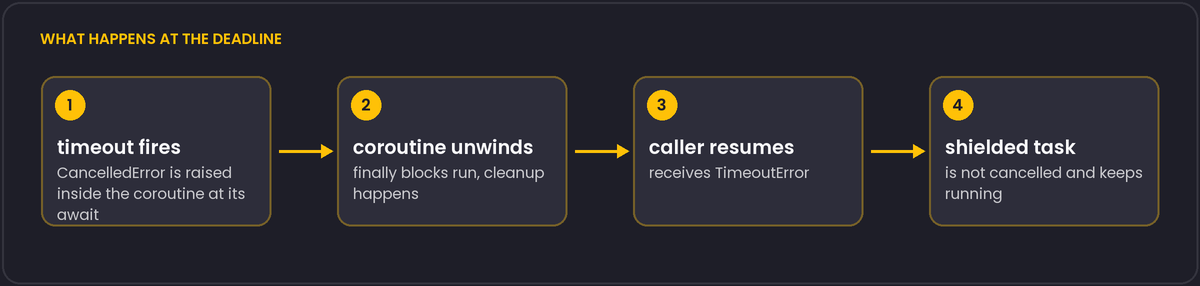
That is what you want for an operation that must not be interrupted halfway, such as committing a transaction or finishing a payment call. It is not a way to make a timeout stop the work. If the caller times out and moves on, the shielded task keeps running with nobody watching, so give it an owner: keep a reference, await it later, or log its result in a done callback.
Design guidance
Set timeouts at the outermost boundary you control, once, rather than sprinkling them through nested calls, where the shortest one wins in confusing ways. For network clients, also set the client's own connect and read timeouts. An asyncio timeout that cancels a request abandons the connection, and depending on the library, it may need to be closed properly rather than returned to the pool.
Nested timeouts, and telling a real cancel from a timeout
asyncio.timeout blocks can nest, and we confirmed the intuitive behaviour: whichever deadline is shortest fires first, raising TimeoutError at that level, while outer timeouts that have not yet expired are unaffected by it. This makes it safe to wrap an individual network call in a short timeout inside code that is itself called under a longer, outer deadline for the whole operation.
Since Python 3.11, Task.cancelling() reports how many pending cancellation requests a task has, and Task.uncancel() decrements that count, which exists specifically so that code catching a CancelledError for cleanup purposes can distinguish "I am fully handling this cancellation" from "something else also wants this task cancelled and I should let it propagate". Library code that catches CancelledError to run cleanup and then decides whether to re-raise can check cancelling() before and after to make that decision correctly instead of assuming there is only ever one reason a task might be cancelled at a time. This is a fairly advanced corner of the API; most application code only needs the simpler rule from above, that CancelledError must always be allowed to propagate unless you are certain you are the one who should stop it.