
Redis persistence: what a restart really costs you

Redis keeps everything in memory, so it is easy to forget that a restart can lose data, or that a full memory can start rejecting writes. Three settings decide the outcome.
RDB: periodic snapshots
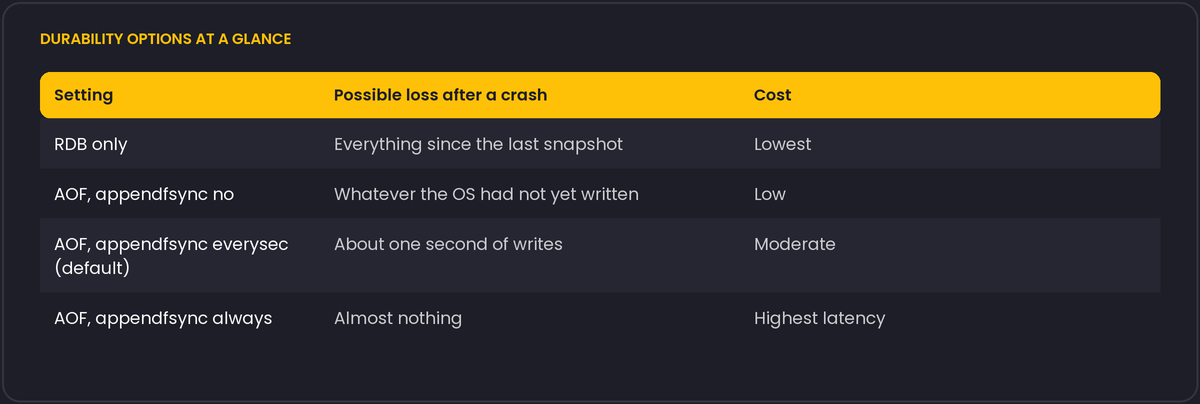
RDB writes a point-in-time snapshot of the dataset to disk at intervals defined by save rules, for example "after 300 seconds if at least 100 keys changed". Snapshots are compact and fast to load. The price is that everything since the last snapshot is lost after a crash. For a cache, that is acceptable. For sessions or queues, it may not be.
AOF: a log of writes
The append-only file logs every write command, and Redis replays it on startup. How much you can lose depends on appendfsync:
always: sync after every command. Safest and slowest.everysec: sync once a second. This is the default, and a crash loses up to about a second of writes.no: leave it to the operating system. The fastest, with the least protection.
Many deployments enable both: AOF for durability and RDB for quick restores and backups. Test the restore path. A backup that has never been loaded is a guess.
Memory limits and eviction
maxmemory sets the ceiling, and maxmemory-policy decides what happens when it is reached. The default policy is noeviction: Redis stops accepting writes that need more memory and returns errors, while reads continue. That is right for a primary store and surprising for a cache. For a pure cache, set allkeys-lru (or allkeys-lfu) so old keys make room. If some keys must never be evicted, use volatile-* policies together with TTLs, and make sure the important keys have no TTL. Mixing cache and durable data in one instance leads to trouble, so use separate instances or databases with different configurations.
Fork, memory and the operating system
Snapshots and AOF rewrites fork() the process. The child shares memory copy-on-write, and every page the parent modifies during the snapshot has to be copied. On a write-heavy instance, memory use can rise substantially while the child runs, and in the worst case approach double. Leave headroom on the machine for that, and do not set maxmemory to all available RAM.
Redis logs warnings at startup that are worth reading: vm.overcommit_memory = 1 is recommended so that the fork does not fail under memory pressure, and transparent huge pages should be disabled, because they cause latency spikes and larger copy-on-write overhead. These are kernel settings on the host, not Redis settings, so they belong in your provisioning scripts.
Security belongs in the same checklist
Require a password or ACL users, bind to the interface you need, keep protected-mode on, and do not expose the port to the internet. Anything that can write to Redis can also change your data, and if your application deserialises what it reads (as pickle-based caches do), more than that.
Questions to answer before going live
How much data can this instance lose, and does the setting match that answer? What happens at the memory limit? How long does a restart take with the real dataset, and how does the application behave in the meantime?
AOF rewrites, and why they used to be riskier
The append-only file grows forever if nothing trims it, since it logs every write command rather than the current state. Redis periodically rewrites it into a compact form representing only the current dataset, either automatically based on growth thresholds or on demand with BGREWRITEAOF. Since Redis 4.0, the rewritten AOF file starts with an RDB-format preamble followed by the more recent write commands, controlled by aof-use-rdb-preamble (on by default), which makes both writing and loading the rewritten file substantially faster than the older pure-command-log format, because loading now replays a compact binary snapshot for the bulk of the data instead of re-executing every historical command that produced it.
Both BGSAVE (the command behind automatic RDB snapshots) and BGREWRITEAOF fork the process to do their work in the child, which is the same fork behaviour, and the same copy-on-write memory cost, described above for snapshots generally; an AOF rewrite is not a cheaper operation than a snapshot in that respect, it is subject to the identical memory-spike consideration.