Schema changes without downtime: the lock queue problem
Adding a column takes milliseconds in a test database. In production, the same statement causes a minute of errors. The statement was not slow. It waited.
The lock queue
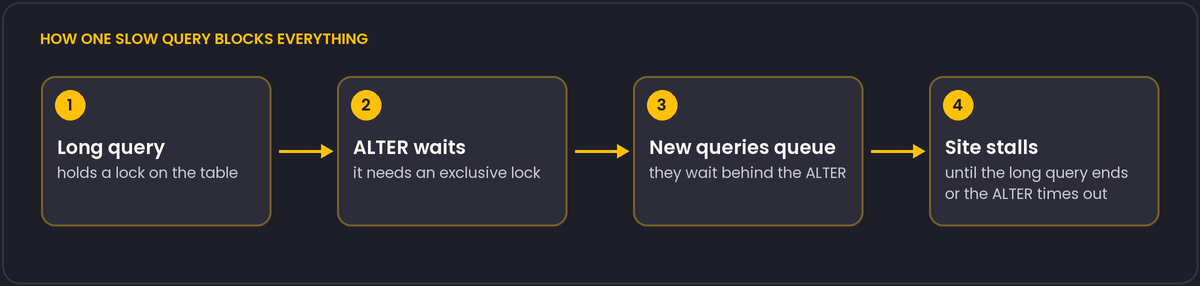
Most ALTER TABLE operations need an ACCESS EXCLUSIVE lock on the table, which conflicts with everything, including plain reads. If a long-running query (a report, or a transaction someone left open) holds a lock on the table, the ALTER waits for it. While it waits, it sits in the lock queue, and every new query on that table queues behind the waiting ALTER, even ordinary SELECTs that would normally not conflict with the old query. One slow query plus one migration stops the table.
The defence is a short lock_timeout for the migration:
SET lock_timeout = '3s';
ALTER TABLE orders ADD COLUMN note text;
If the lock cannot be acquired in three seconds, the migration fails immediately and the queue clears. Retry it a bit later. A failed migration is cheap, while a blocked table is not.
Operations and what they cost
- Adding a nullable column is a metadata change and quick, apart from the lock.
- Adding a column with a default. Since PostgreSQL 11, a constant (or non-volatile) default is stored in the catalog and no rewrite happens. A volatile default such as
random()still rewrites the table. Older versions rewrite in every case. - Adding
NOT NULLnormally scans the whole table under a strong lock. The safer sequence is: add aCHECK (col IS NOT NULL) NOT VALIDconstraint, which is instant; runVALIDATE CONSTRAINT, which scans without blocking writes; thenSET NOT NULL, which on PostgreSQL 12 and later uses the validated constraint and skips the scan, and drop the check. - Creating an index blocks writes for its duration.
CREATE INDEX CONCURRENTLYbuilds without blocking writes, takes longer, and cannot run inside a transaction block. If it fails it leaves anINVALIDindex behind that you have to drop. - Adding a foreign key validates every row. Add it as
NOT VALIDfirst andVALIDATE CONSTRAINTafterwards. - Changing a column type usually rewrites the table. Add a new column, backfill in batches, switch the code, and drop the old column.
Backfilling data
Update rows in batches of a few thousand, committing between batches, so that no single transaction holds locks for long or produces a huge amount of WAL. Sleep briefly between batches if replicas fall behind.
In Django
Migrations run inside a transaction by default, which conflicts with CONCURRENTLY. Use the operations in django.contrib.postgres.operations (AddIndexConcurrently) and set atomic = False on the migration. Separate schema changes from data migrations, and deploy in steps: first a migration that is compatible with the old code, then the new code, then the cleanup migration. That way a rollback of the code never meets a schema it cannot use.
Before you run it
Check for open long transactions in pg_stat_activity, run the migration on a copy with production-sized data, and know how you would cancel it. Migration tools that lint for dangerous operations catch many of the above automatically, and they are worth adding to the review process.
lock_timeout and statement_timeout answer different questions
The two settings are easy to conflate because both can turn a stuck request into an error, but they guard different things. lock_timeout limits how long a statement will wait to acquire a lock it needs before it can even begin executing; statement_timeout limits the total execution time of a statement once it is running, lock waits included. A migration protected only by statement_timeout can still sit in the lock queue described above for the whole timeout period, blocking other queries behind it in the meantime, and only then fail, having caused the exact disruption you were trying to avoid before it finally gives up. lock_timeout is the setting that actually prevents the queue from forming in the first place, which is why it is the one to set specifically for schema changes; statement_timeout remains useful as a separate, general safety net against any query, migration or not, running longer than expected once it has started.
While a migration is in progress, pg_stat_activity shows exactly what is happening in real time: rows with wait_event_type = 'Lock' are sessions currently blocked waiting for a lock, and cross-referencing their query and pid columns against pg_locks identifies precisely which other session is holding the lock the migration (or a queued ordinary query) is waiting for, which is the fastest way to confirm the cause during an incident rather than guessing from the symptoms alone.