
fsync, write caches and the SSD that lies about durability

A database tells you a transaction is committed. What that means depends on a chain of layers, and each one can hold data in volatile memory unless it is told not to.
The chain
The database writes its log, then asks the operating system to make it durable with fsync. The operating system passes the request to the storage device. The device is supposed to report success only after the data is on non-volatile media. The layers that can break the promise: settings that disable fsync, file systems or virtual disks that ignore flush requests, RAID controllers with volatile caches, and drives whose write cache is not protected against power loss.
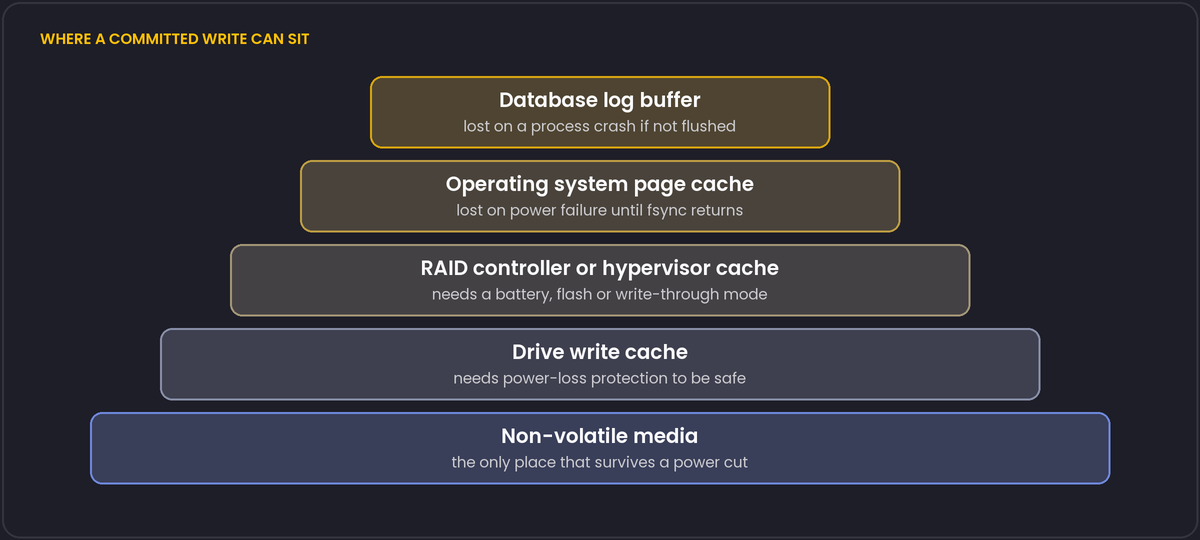
What consumer SSDs do
Flash is written in large blocks, and drives use a volatile cache (and, on many models, a portion of flash used as a fast buffer) to speed this up. Enterprise drives typically have capacitors that hold enough energy to finish writing the cache when the power drops, so they can acknowledge a flush quickly and safely. Many consumer drives lack that protection. Some acknowledge flushes honestly and are slow at it, others acknowledge quickly, and the last transactions may be lost or the drive may corrupt in-flight data after a power failure. Reviews and independent tests of specific models exist, and are worth checking before you use a drive for a database.
A useful measurement tool ships with PostgreSQL: pg_test_fsync reports how many flushes per second the disk sustains for the different sync methods. A number that looks too good for the hardware, a spinning disk claiming tens of thousands of syncs a second, is a sign that something is acknowledging without writing.
Database settings that trade safety for speed
fsync = offin PostgreSQL removes the flushes, and a crash can leave the database corrupt. It is only reasonable for data you can rebuild, such as a throwaway test instance.synchronous_commit = offlets a commit return before its log record has been flushed. After a crash, the most recent commits (bounded by a small multiple ofwal_writer_delay, which is 200 ms by default) can be lost, but the database stays consistent. That is a legitimate choice for data where losing the last fraction of a second is acceptable, and you can set it per transaction.- Replication adds another option: synchronous replication waits for a standby to confirm, which protects against losing the primary machine as well as a power cut.
Cloud and virtual machines
Managed databases and network block storage handle durability in their own way, and providers document what they guarantee. On a virtual machine, check how the hypervisor treats flush requests, and how the virtual disk is configured. Latency on network disks is usually higher than local NVMe, which affects commit latency directly, since every commit waits for a flush.
A practical checklist
Use drives with power-loss protection for the write-ahead log and data. Keep the RAID controller cache battery- or flash-backed, or disable the cache. Measure with pg_test_fsync. Pull-the-plug testing is unpleasant but the only real proof. And remember that backups and replicas are separate from durability: they protect against different failures.
The 2018 fsync() surprise
For a period, Linux had a documented behaviour that undermined the assumption every database durability model above depends on: if fsync() failed (for example because the underlying storage had an I/O error) and the process had not yet observed that failure, the kernel could mark the dirty pages as clean anyway once it gave up retrying, meaning a later fsync() call from the same or another process could report success even though the earlier write had actually been lost. PostgreSQL's response, since this became widely known around 2018, was to treat any fsync() failure as fatal and crash the server rather than continue and risk silent corruption, on the reasoning that a crash and recovery from a known-good point is safer than continuing on top of data the kernel has already given up on. The episode is worth knowing about specifically because it shows the durability chain described above can be undermined at a layer well below the database's own settings, in an interaction between the kernel's page cache and the storage driver that individual application code has no visibility into at all; keeping the kernel and storage drivers current, and reading the release notes of major kernel upgrades for storage-related fixes, is part of the same durability checklist as the hardware and PostgreSQL settings above.