WebSockets that die after exactly 60 seconds
The chat works in development and drops in production after exactly a minute of silence. Round numbers point to configuration, and the culprit is normally a proxy in between.
The default that bites
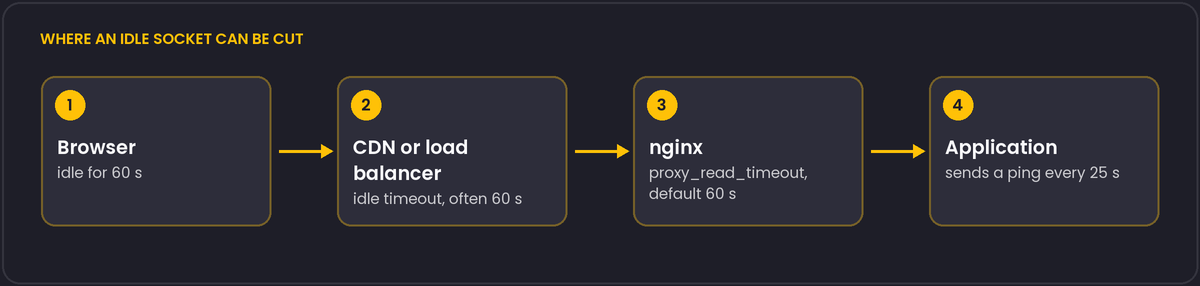
nginx's proxy_read_timeout defaults to 60 seconds. If the upstream sends nothing for that long, nginx closes the connection, which is right for ordinary requests and wrong for a socket that is legitimately idle. Many load balancers behave similarly: an AWS Application Load Balancer, for example, has a default idle timeout of 60 seconds. When you have more than one proxy, the shortest timeout wins, and it is often not the one you are looking at.
The minimal nginx configuration
location /ws/ {
    proxy_pass http://app_backend;
    proxy_http_version 1.1;
    proxy_set_header Upgrade $http_upgrade;
    proxy_set_header Connection "upgrade";
    proxy_read_timeout 3600s;
}
Without the Upgrade and Connection headers and HTTP/1.1, the handshake fails outright. A long proxy_read_timeout is fine on that location as long as you have another way to notice dead peers.
Send a heartbeat anyway
A long timeout hides the problem rather than fixing it. Two ends of a TCP connection do not learn that the other side vanished (a phone that lost signal, a laptop that went to sleep) until they try to write. The robust design is an application-level ping, for example every 20 to 30 seconds, with a rule that a connection that does not answer within a couple of intervals is closed and re-established by the client.
WebSocket has ping and pong control frames for this. Browsers answer pings automatically but do not expose them to JavaScript, so a server-initiated ping detects dead clients, while a client that wants to detect a dead server needs its own message-level heartbeat.
Reconnect logic belongs on the client with exponential backoff and jitter. Otherwise, after a server restart, every client comes back in the same second.
Not every AWS load balancer uses the same default
If the traffic passes through more than one AWS load balancer type, the idle timeout is not the same everywhere. An Application Load Balancer (ALB) defaults to 60 seconds, same as nginx. A Network Load Balancer (NLB), which operates at a lower layer, has a much longer default idle timeout, documented at 350 seconds. Mixing the two in front of the same service, or migrating from one to the other, can change socket behaviour without a single line of application code changing, which makes it a confusing regression to track down after the fact.
The same "shortest timeout wins" rule applies across CDNs in front of a load balancer. Many CDNs proxy WebSocket traffic with their own idle limit, separate from anything configured on the origin, and it is not always documented as clearly as nginx's proxy_read_timeout. When a socket dies at a suspiciously round number that is not 60 seconds, check the CDN's current documentation for WebSocket-specific limits before assuming the problem is on your own infrastructure.