__slots__ measured: what you really save per object
Every advice thread on Python memory mentions __slots__. Fewer of them show numbers, so here are some. The test creates one million instances of a class with three integer attributes and measures allocation with tracemalloc on Python 3.14.4.
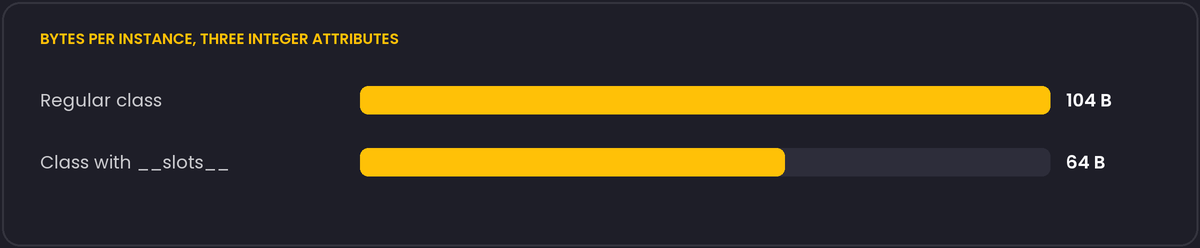
The figures include the pointer that each object occupies in the list holding it. The small integers are shared objects, so the difference is purely the per-instance overhead: the regular class carries a __dict__ for its attributes, and the slotted class stores them in fixed positions.
When it matters
- A million objects: about 40 MB of difference. That is real on a small server or in a data-heavy job.
- A few thousand objects: a few hundred kilobytes. Nobody will notice, and you would be paying with flexibility.
Attribute access speed is a separate question from memory, covered with its own measurement further down.
What you give up
- There is no
__dict__, so you cannot add attributes on the fly. Code that sets extra attributes, or libraries that assume a__dict__(some mock and serialisation helpers), will fail withAttributeError. - Weak references need a
'__weakref__'entry in the slots, otherwiseweakref.ref(obj)raisesTypeError. - With inheritance, every class in the chain has to declare slots to get the saving, and multiple inheritance from two classes that both define non-empty slots does not work.
- Default values can no longer be class attributes that share a name with a slot.
The easy way in
For plain data holders, @dataclass(slots=True) (Python 3.10 and later) generates the slots from the fields and keeps the rest of the dataclass behaviour. hasattr(instance, '__dict__') is then False, which is a quick way to confirm it took effect.
If the objects number in the millions, ask whether they need to be objects at all. A NumPy array, a struct-packed buffer or a column in a DataFrame usually shrinks memory by a much larger factor than slots.
Attribute access speed: not the reason to switch
Memory is not the only thing slots are said to change. We timed reading three attributes from both classes with timeit, two million iterations, three separate runs, on the same Python 3.14.4 build used for the memory measurement:
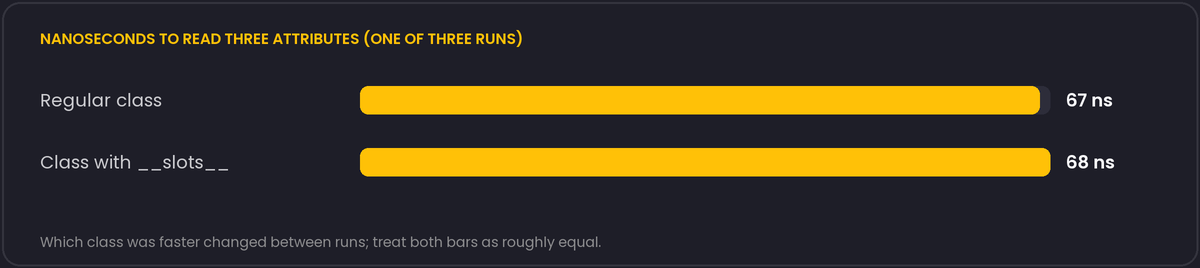
The numbers moved between runs by more than the gap between the two classes, and which one came out ahead was not even consistent. Whatever difference exists at the bytecode level is small enough to disappear into ordinary measurement noise on this build. Treat the memory saving as the real reason to use slots, and treat any specific access-speed claim, including ones in other articles, as something to re-measure on your own build and workload rather than take on faith.
__slots__ also interacts with properties in a way worth knowing: a @property with the same name as a slot conflicts, because both want to control that attribute name on the class. Define properties under a different underlying slot name (_value backing a value property) the same way you would without slots.