OPcache in production: the settings that actually matter
A PHP application feels slower than it should, and the profiler shows time spent compiling the same files again and again. OPcache exists to prevent that. It stores compiled scripts in shared memory so PHP does not parse them on every request, and its default configuration is a compromise for development, not for production.
Timestamp validation
By default, opcache.validate_timestamps is on, and every opcache.revalidate_freq seconds (2 by default) PHP checks whether each cached file changed on disk. That is what lets you edit a file and see the change. In production it costs filesystem calls for nothing, since files change only on deploy. Turn it off:
opcache.validate_timestamps=0With validation off, PHP never notices new files. Every deploy therefore has to clear the cache: reload PHP-FPM (systemctl reload php8.3-fpm), or call opcache_reset() from a small protected script that runs inside the FPM pool, since the CLI has its own separate cache. Symlink-based deployment schemes have a related trap: if the path resolves to the old release directory in the cache, code can keep running from the previous release, so test that a deploy actually changes behaviour.
Memory that is too small fails quietly
The defaults are a 128 MB cache (opcache.memory_consumption), 8 MB for interned strings and up to 10,000 cached files (opcache.max_accelerated_files). A framework plus its vendor directory can exceed 10,000 files easily. When the cache is full, PHP does not fail. It stops caching new scripts, or restarts the cache, and performance drops with no error.
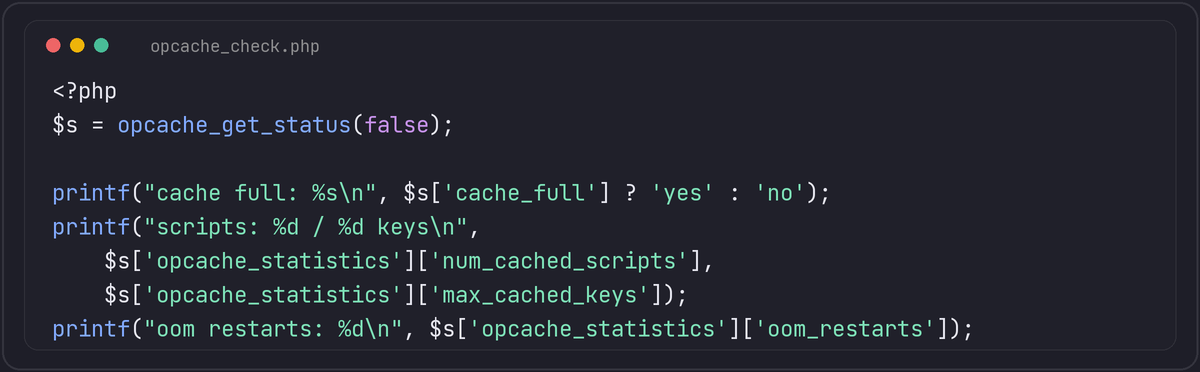
Look at opcache_get_status(). In the result, cache_full tells you whether the cache ran out, opcache_statistics.oom_restarts and hash_restarts count forced restarts, and num_cached_scripts against max_cached_keys shows how close you are to the file limit. Raise memory_consumption and max_accelerated_files until there are no restarts, with some room to spare. Count your PHP files with find . -name '*.php' | wc -l to choose a value.
Preloading and JIT
opcache.preload loads a list of classes into memory at server start and keeps them there for every request, which can help frameworks with a stable set of core classes. It needs care: preloaded code cannot be changed without restarting PHP, and mistakes show up as startup errors.
The JIT compiler in PHP 8 (opcache.jit and opcache.jit_buffer_size) is disabled by default because the buffer size is zero. It benefits CPU-heavy numeric code. For typical web requests, which spend their time waiting on the database and the network, the PHP documentation and most benchmarks show little gain, so do not turn it on hoping for a speedup without measuring your own application.
Checklist
validate_timestamps=0in production, and a deploy step that reloads FPM.- Enough memory and file slots, verified with
opcache_get_status()after a busy period. - The same settings in the CLI only if you run long workers there, since queue workers have their own OPcache and must be restarted on deploy as well.
Containers restart with a cold cache every time
Everything above assumes a long-lived server where OPcache warms up once and stays warm. A container that gets rebuilt and redeployed on every release starts with an empty cache every single time, and the first requests after each deploy pay the full compilation cost again, which can look like a performance regression that "fixes itself" after a minute under load. opcache.file_cache, pointed at a path, adds a secondary on-disk cache that can survive a process restart within the same container filesystem, and for a genuinely fresh container, explicitly warming the cache during the image build or at container start, by looping over the deployed files and calling opcache_compile_file() on each one before traffic arrives, avoids the cold-start penalty entirely instead of accepting it on the first real requests.