Composer in production: install, optimise, audit
Composer commands are usually learned on a laptop, and a few of them behave differently when the goal is a reproducible production build.
Install, do not update
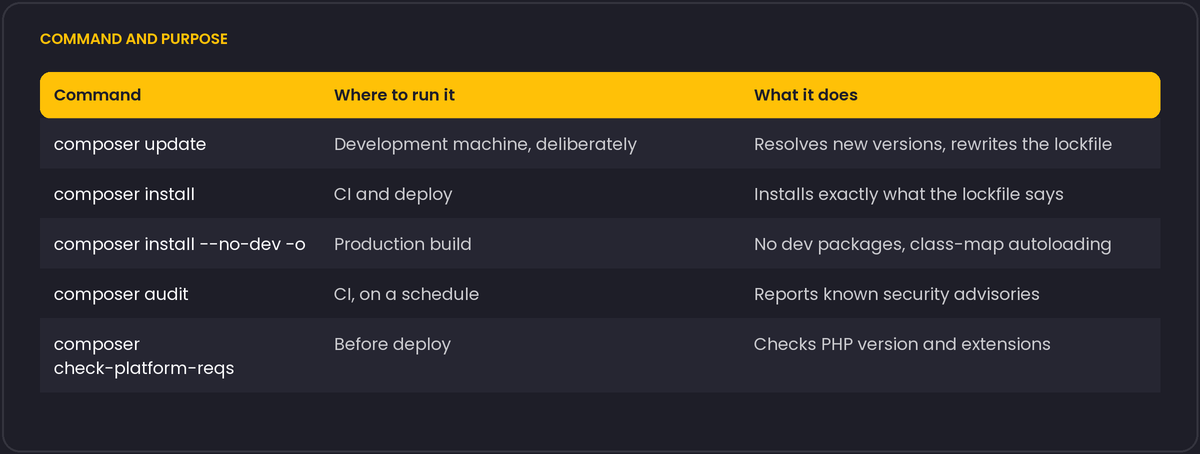
composer install reads composer.lock and installs exactly the versions recorded there. composer update ignores the lock, resolves the newest allowed versions and rewrites it. Running update on a server produces a different set of packages than the one you tested. Commit composer.lock, run update on a development machine on purpose, test, commit, and deploy with install.
The production command
composer install --no-dev --optimize-autoloader --no-interaction--no-devskips packages fromrequire-dev, which reduces size and the attack surface, since test frameworks and debug tools should not be on a live server.--optimize-autoloader(-o) builds a class map at install time, so the autoloader looks up classes in an array instead of checking the filesystem for each one. It is one of the cheapest performance improvements you can make.--classmap-authoritativegoes further: if a class is not in the map, Composer does not search the filesystem at all. It is faster still, with the requirement that every class is known at build time, so it does not suit code that generates classes at runtime. It also implies that the autoloader will not find classes in files you drop in later.
Do the install in a build step (CI or a build directory) and ship the result. That way the server never needs Composer, network access to package sources or compilers.
Platform configuration
Set the PHP version you deploy to, so that a developer running a newer PHP cannot resolve dependencies that will not run in production:
{
  "config": {
    "platform": { "php": "8.3.0" }
  }
}
composer check-platform-reqs verifies that the current PHP and its extensions satisfy what the lockfile needs, which catches a missing ext-intl during deployment and not after.
Audit
composer audit, available since Composer 2.4, checks the installed packages against known security advisories and returns a non-zero exit status when it finds any. Run it in CI and on a schedule, since a new advisory can affect code you have not touched. composer outdated --direct lists newer versions of your direct dependencies.
Habits that prevent surprises
- Pin to ranges you understand.
^2.4allows minor updates,~2.4.1only patch releases. Know what your lockfile freezes. - Review the lockfile diff in pull requests. A large unexpected change is worth reading.
- Avoid
dev-masterand VCS repository dependencies in production code where you can. - Composer scripts and plugins run code.
--no-scriptsskips scripts in special cases, andallow-pluginsincomposer.jsonrestricts which plugins are allowed to run. - Keep an eye on abandoned packages, which
composer auditalso reports.
Caching the download cache, not the vendor directory, in CI
A CI pipeline that reruns composer install on every build benefits from caching Composer's own download cache directory (composer config cache-dir, commonly under ~/.cache/composer or .composer/cache) between runs, so previously downloaded package archives do not need to be fetched again from the network. This is a different, safer thing to cache than the vendor/ directory itself: caching vendor/ directly risks serving a stale install that does not match a composer.lock that changed since the cache was written, while the download cache is keyed by package and version, so it is naturally invalidated for anything that actually changed and stays valid for everything that did not. Most CI providers document a recommended path and cache key for this exact case.
For build steps that run as root, which is common inside a minimal CI container image, Composer refuses to run and asks for COMPOSER_ALLOW_SUPERUSER=1 (or the equivalent flag) before it will proceed, as a safety check against running arbitrary package scripts with root privileges by accident on a developer's own machine; inside a disposable CI container the protection is less meaningful; set the variable there deliberately rather than working around it in a less visible way.